
0xArchive market data guide · order books
You have traded around a bid wall. 40 BTC sitting a few dollars under the price, so your stop goes under it. That wall is level 2 market data, and level 2 cannot tell you whether it is forty traders or one wallet.
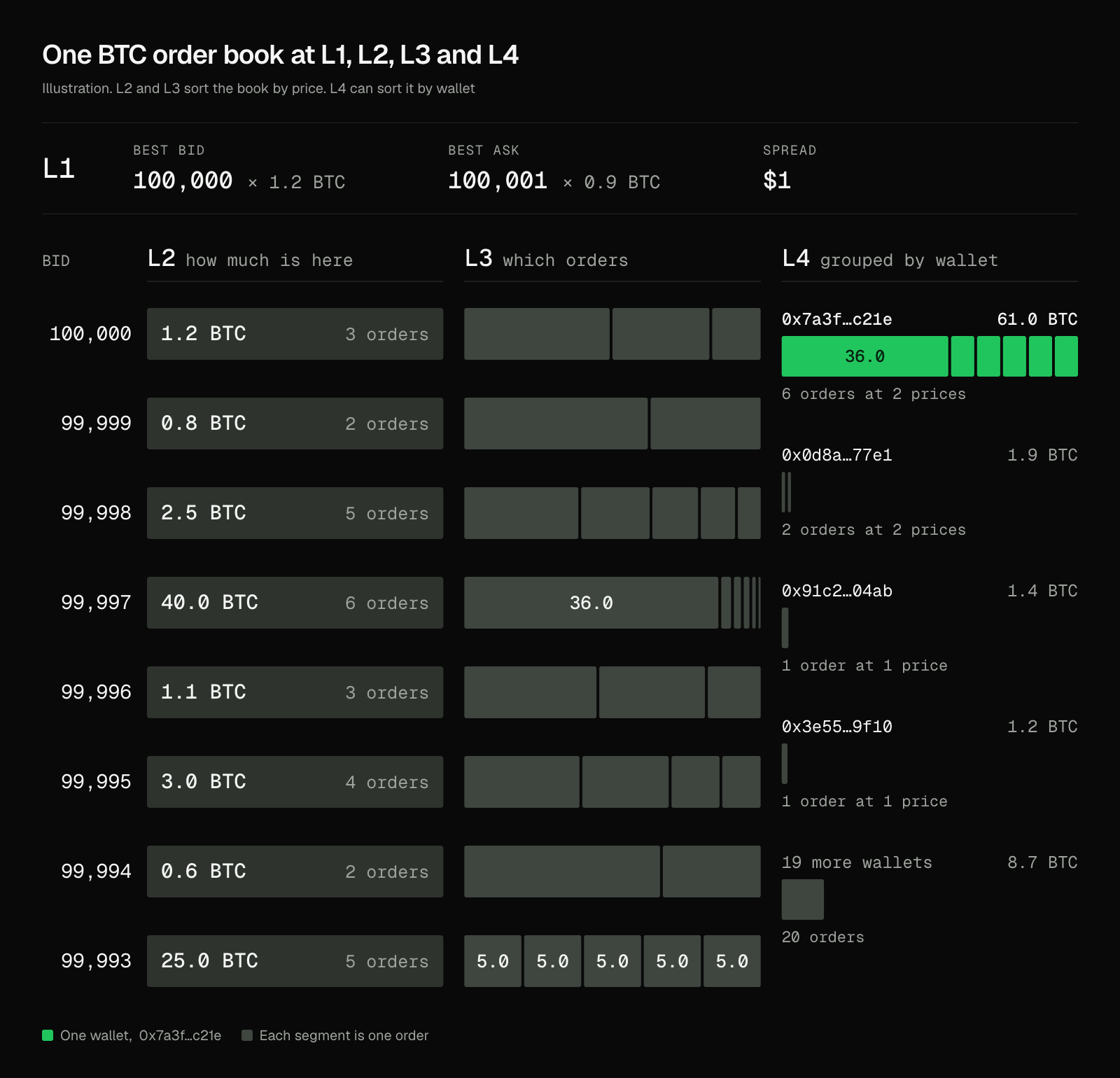
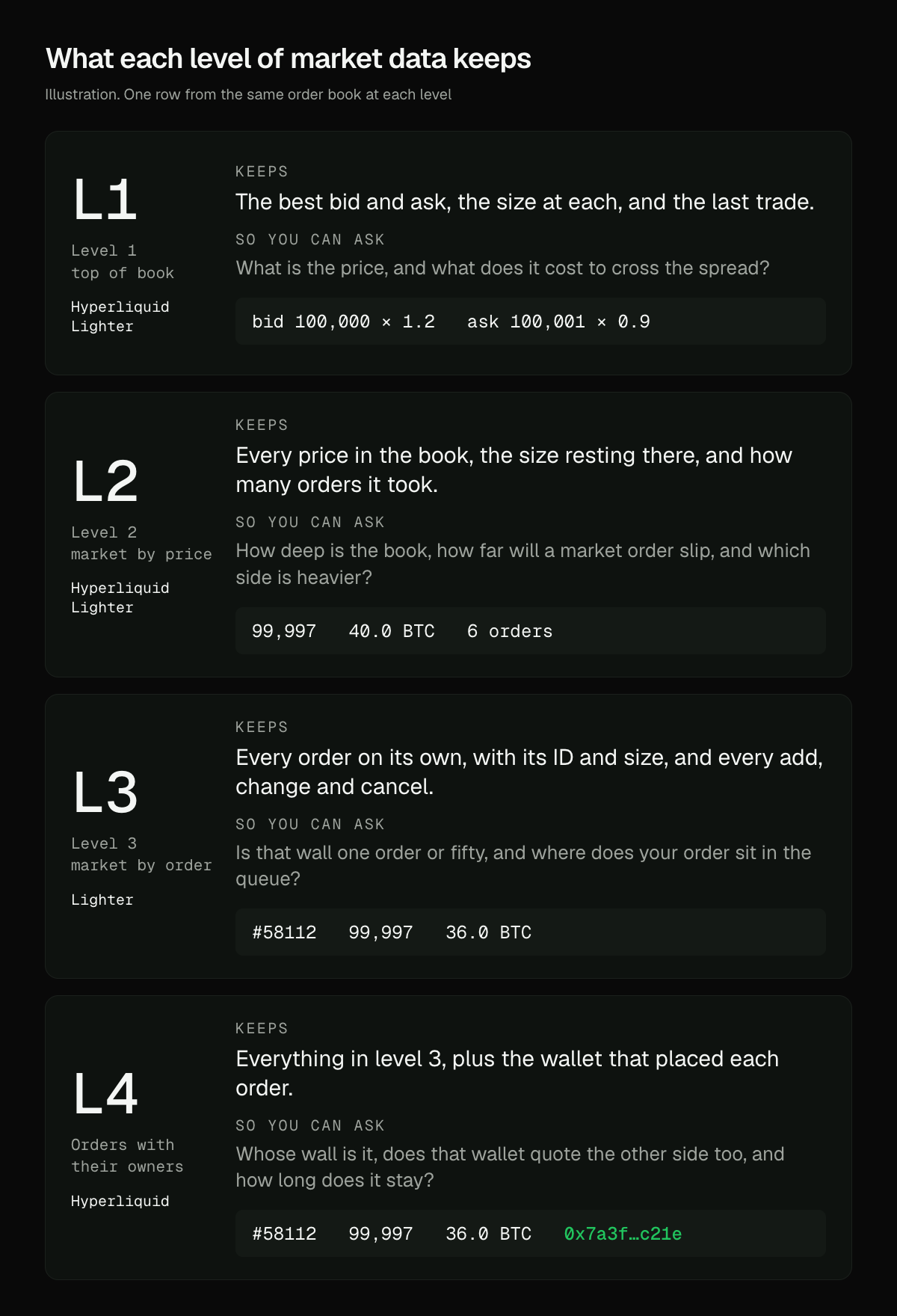
Level 1 is the best bid, the best ask and the last trade. Level 2 is every price in the book with the total size resting there. Level 3 is every single order. L4 is every order plus the wallet that placed it, which is what 0xArchive records for Hyperliquid.
Level 1 market data is the best bid and the best ask
An order book, or limit order book, is every buy and sell order resting on an exchange, sorted by price. Level 1 is the top of it: the highest bid, the lowest ask, the size at each, and usually the last trade. Most price tickers and quote screens run on it.
It tells you the price and what it costs to cross the spread. In the example the spread is $1, and that is everything level 1 knows about the book.
At level 1, the 40 BTC wall under the price does not exist.
Level 2 data adds up every order resting at each price
Level 2 data is market by price. Every price in the book gets one row: the price, the total size resting there, and on Hyperliquid, how many orders it took.
This is the order book most traders picture, and it answers the depth questions. How much you can fill near the price. How far a big market order slips. Which side is heavier, which is what order book imbalance measures.
| What you measure | What it tells you | In the example |
|---|---|---|
| Order book depth | How much you can fill near the price | 48.6 BTC bid within $5 of the best bid |
| Slippage | How far a market order moves the price | A 45 BTC market sell fills down to 99,996, an average of 99,997.16 |
| Imbalance | Which side of the book is heavier | Bids outweigh asks 4.9 to 1 within $5, 48.6 BTC against 10.0 |
Most of that bid weight is one 36 BTC order, and level 2 has no way to show it.
Level 3 data splits each price back into single orders
Level 3 data is market by order: every resting order on its own, with an ID and a size, in the order it joined the queue. A full level 3 feed also carries every add, change and cancel. On most exchanges that is where it stops, and the orders carry no owner.
Now the 40 BTC wall has a shape: one big order and five small ones. You can see where your own order sits in the queue and how long each order lives. The five equal orders at 99,993 still read as five separate buyers.
L4 adds the wallet behind every order
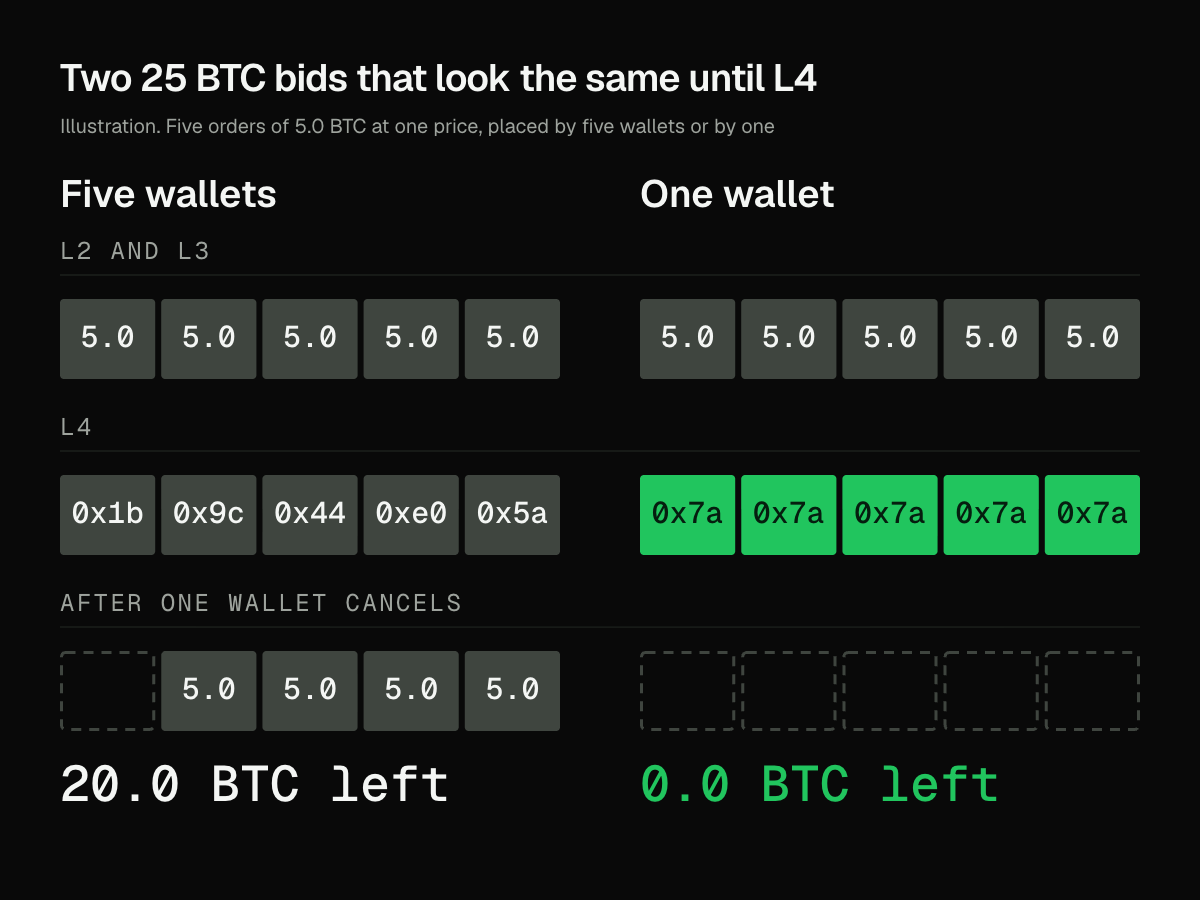
L4 is level 3 plus the wallet that placed each order, with every add, change and cancel arriving block by block. It exists because Hyperliquid runs its order book on chain, where a wallet signs every order. Hyperliquid's own order book server calls the full feed l4Book.
At L4, the five buyers at 99,993 are one wallet, and one wallet can pull all five at once.
In the example, that one wallet holds 61 BTC across the book's two walls. Check whether it also quotes offers on the other side. If it does, you are looking at a market maker who moves both quotes together. If it does not, it is a buyer with a plan, and you can watch whether it keeps rebuilding the bid.
Level 3 means something different in stocks
If you learned these terms trading stocks, the names shift. On Nasdaq, Level 2 lists quotes by market maker, and Level 3 is the screen market makers use to enter and change their quotes rather than a deeper data feed.
| Name | Stocks (Nasdaq) | Crypto order book data |
|---|---|---|
| Level 1 | Best bid, best offer and last sale | Best bid, best ask and last trade |
| Level 2 | Quotes listed by market maker | Total size at every price |
| Level 3 | Quote entry for registered market makers | Every individual order |
| L4 | Not used | Every order with its wallet, on Hyperliquid |
Pick the level of market data by the question you are asking
Start at the lowest level that answers your question. Level 1 runs a price alert. Level 2 runs a depth chart, a slippage estimate or an imbalance signal. Level 3 runs queue position and fill simulation. L4 runs anything that needs to know who: whale tracking, telling a market maker from a buyer, following one wallet's orders across a day. The trade-offs between snapshots and order-level history are in when checkpoint history is enough and when you need order-level depth.
Hyperliquid has L4 and Lighter has L3 on 0xArchive
0xArchive records Hyperliquid at L4 and builds full-depth L2 from that same book. At 14:03:59 UTC on 2026-09-15, the Hyperliquid BTC book alone held 58,959 resting orders. The Hyperliquid order book data guide covers reconstruction and history.
Lighter is recorded at L3, and every order there carries the account number that placed it. The Lighter L3 guide walks through the fields.
| Level | Hyperliquid | Lighter |
|---|---|---|
| L1 and L2 | Full depth since 2026-03-10, built from the L4 book | Aggregated price levels |
| L3 | Included in L4 | Every order with its account number, up to 250 a side per snapshot |
| L4 | Every order with its wallet, as snapshots, history and a diff stream | Not offered |
Run this analysis from an agent
L2, L3 and L4 are all endpoints an agent can call. 0xArchive ships an MCP server, so Claude and other AI agents can pull L2, L3 and L4 books in plain language. There is a Claude Code skill for terminal workflows and an agentic gateway for agents that pay per call. Start with the agent surfaces overview or the guide to replayable market data for MCP, CLI and agent workflows.
Route references
Use the order book routes reference for L2 and L4 snapshots and history, the Lighter REST reference for Lighter's L3 book, and the WebSocket L4 order book reference for streaming and replay. The order book depth guide covers which level each workflow needs.
For current API availability and plan details, use the Hyperliquid data API, data catalog, pricing, and status.