
A stop-loss on Hyperliquid fires when the mark price reaches your trigger. What happens next depends on the order type. A stop market sells at once, and a stop limit only sells at your limit price or better.
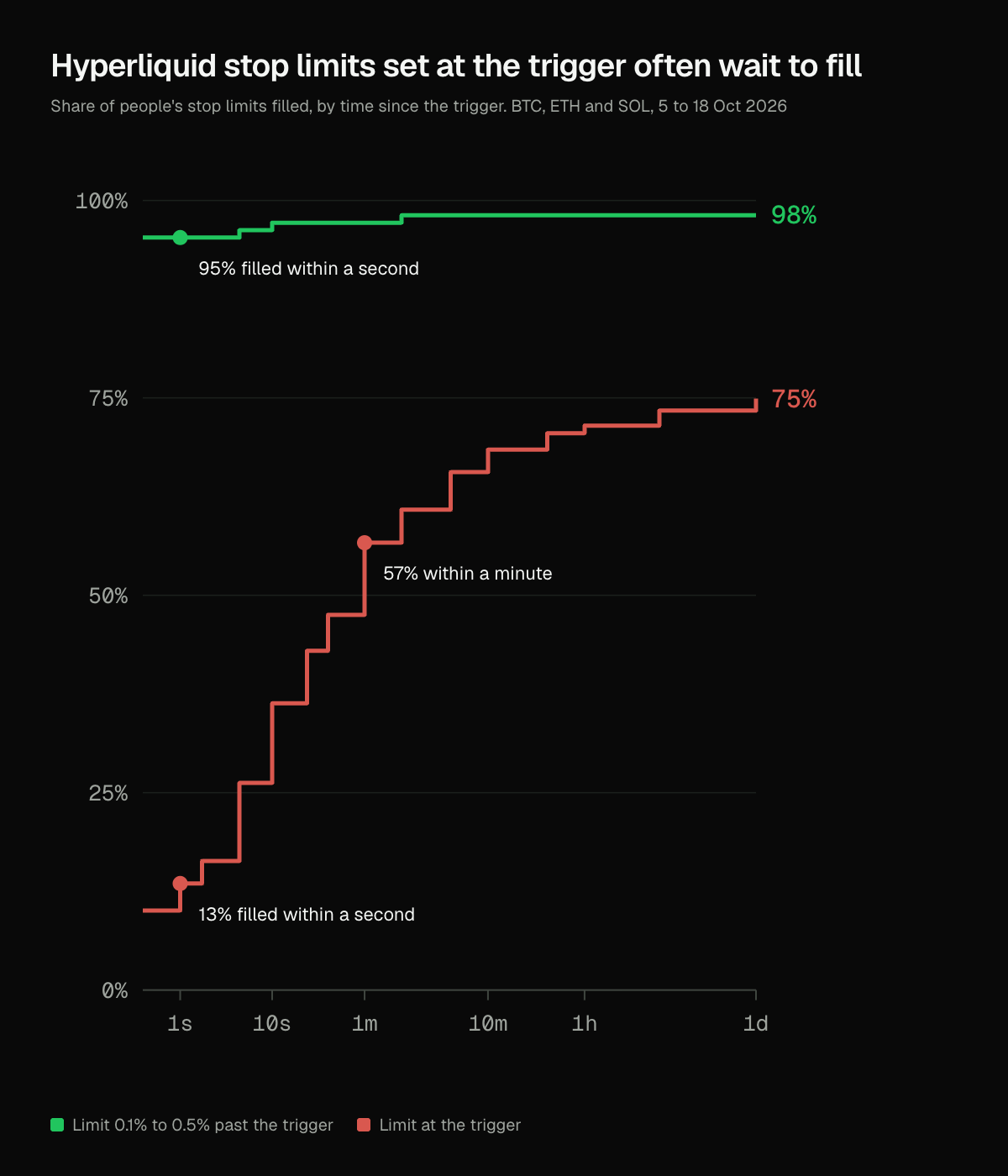
That limit price decides more than most traders expect. From 5 to 18 October 2026, stop limits set right at their trigger filled within a second only 13% of the time.
Leave the limit a little room past the trigger and the result flips. Those stops filled within a second 95% of the time.
Hyperliquid stops trigger on the mark price, not the last trade
The mark price is the price Hyperliquid uses for margin, liquidations, unrealized profit and every TP/SL trigger. It is the median of three prices: Hyperliquid's oracle, the median of its own best bid, best ask and last trade, and the perp prices on other big exchanges.
Because it is a median, one stray trade cannot move it. A quick wick of trades through your stop does not set it off unless the mark follows.
A stop on a long sits below the price and fires when the mark falls to it. A stop on a short sits above and fires when the mark rises to it.
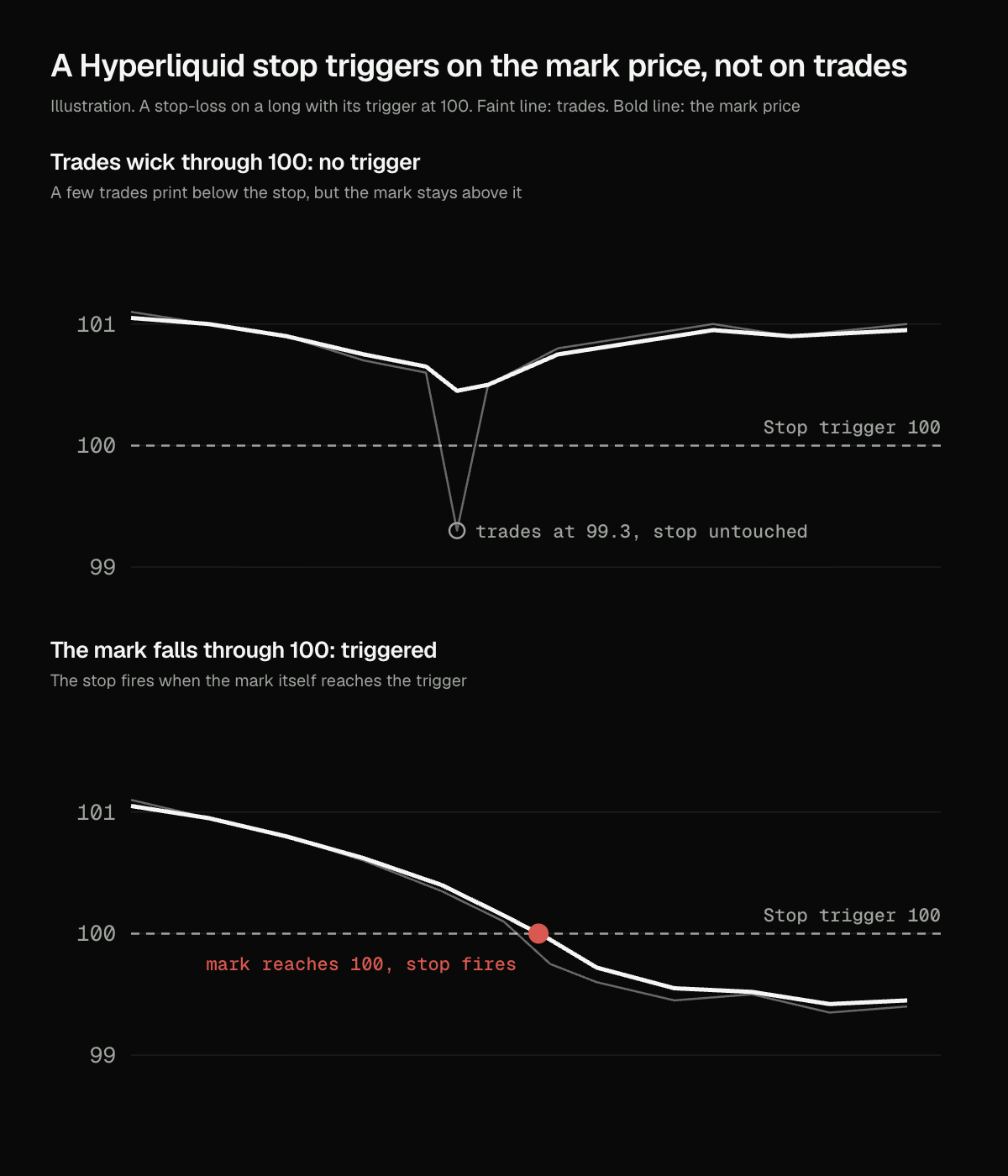
The catch is the other side of the same rule. The mark can sit apart from the price you can actually sell at. When your stop fires, the best bid may already be below your trigger.
Stop market orders sell at once, with up to 10% slippage
When a stop market triggers, it becomes a market order and sells into the bids right away. Hyperliquid gives a triggered TP/SL market order a 10% slippage limit, so it cannot fill at any price at all.
On Hyperliquid's biggest markets that limit rarely matters. A $100,000 bitcoin market order filled a median 60 cents past the mid from 12 October to 11 November 2026, as the guide to Hyperliquid order types measured. On a thin market, or in a liquidation cascade, it can matter a lot.
A stop market always pays the taker fee, 0.045% at Hyperliquid's base rate. In return it almost always gets you out.
A stop limit at the trigger filled within a second 13% of the time
A stop limit becomes a limit order at your limit price when it triggers. The trigger price decides when the order goes in, and the limit price decides the worst price it accepts.
Hyperliquid's own docs use the example of a trigger at $10 with a limit at $10.
Set it that way on a long and the order can only sell at the trigger or higher. If the bids are already below the trigger when the mark gets there, the order rests in the book and waits for price to come back.
That is what the archived order history shows. 1,403 stop limits placed by 655 people triggered on BTC, ETH and SOL from 5 to 18 October 2026, and 526 of them had the limit at the trigger or past it.
| Room past the trigger | Stop limits | Filled within 1 second | Within 1 minute | Within 24 hours |
|---|---|---|---|---|
| None, limit at the trigger or past it | 526 | 13% | 57% | 75% |
| Under 0.1% | 195 | 70% | 86% | 89% |
| 0.1% to 0.5% | 213 | 95% | 97% | 98% |
| 0.5% or more | 469 | 97% | 97% | 97% |
The stops with no room that did fill waited a median 11.5 seconds. A quarter had still not filled a day later. Most of those were cancelled, by the trader or because the position closed some other way.
Three of them were still waiting when the position was liquidated.
Leaving 0.1% to 0.5% of room filled 95% of stop limits at once
Room is how far past the trigger your limit sits: below it on a long, above it on a short. On a $100,000 bitcoin price, 0.1% of room is $100.
The room is also the worst price you accept. Hyperliquid's docs put the trade-off plainly: the more aggressive the limit, the more likely the order fills, and the more it can slip.
So pick by the stop's job. If it is there to get you out, give it room or use a stop market. If the exact price matters more than getting out, a limit at the trigger is a choice to accept that it may not fill.
About half the stop limits people placed in the window already left 0.1% of room or more.
Set a stop-loss on Hyperliquid with the order or on the whole position
There are three ways to set a stop-loss on Hyperliquid.
1. With a new order. Turn on TP/SL in the order form and enter the stop's trigger price. The stop belongs to that order, and Hyperliquid places it only once the order fills.
2. On an open position. Set a TP/SL from the position itself. It covers the whole position by default.
3. As its own order. Place a stop market or stop limit order with reduce only on, so it can close the position but never open a new one.
Each way then asks the same two questions: stop market or stop limit, and how much room to give the limit.
TP/SL on an unfilled order protects nothing until the order fills
The first way has a trap. If the order fills partly and you cancel the rest, its TP and SL are cancelled too, and the part that filled has no stop. Set a new TP/SL on the position when that happens.
A linked TP and SL also cancel each other. When one fills, Hyperliquid cancels the other, which shows up in the archived TP/SL data as a sibling-filled cancel.
The 0xArchive Terminal's fast stop can fire on the book instead of the mark
The 0xArchive Terminal places Hyperliquid stop markets, stop limits and TP/SL orders from one ticket, signed by your own wallet. Live trading in the Terminal launched in November 2026. You can size the order from how much you want to risk to your stop, and drag the TP and SL lines on the chart to move them.
A fast stop is the Terminal's own stop, for when the mark is the wrong price to watch. It can fire on the mark, on your side of the book or on the last trade. When it fires it closes the position with one reduce-only order that fills at once or cancels.
It runs in your browser tab, or on 0xArchive's servers once you set up server trading, so it keeps working after you close the tab. Trailing stops run on the servers too. The servers trade only within limits your wallet signs. Pick it from New algo in the Algos panel.
Watching the last trade makes a stop quicker and also easier to set off with one stray print. That is the reason Hyperliquid triggers on the mark.
The 0xArchive fee is 0.01% of each fill, or 0.005% on most HIP-3 markets, on top of Hyperliquid's own fee. Residents of the United States, the United Kingdom and sanctioned jurisdictions may not trade in the Terminal. Charts are free and need no account.
Common questions about Hyperliquid stop-losses
What price triggers a Hyperliquid stop-loss? The mark price, the median of Hyperliquid's oracle, its own best bid, best ask and last trade, and other exchanges' perp prices. A trade alone crossing your trigger does not set it off.
How do I set a stop-loss on Hyperliquid? Turn on TP/SL in the order form when you place the order, set a TP/SL on the open position, or place a reduce-only stop market or stop limit order. A TP/SL on the position covers all of it.
What is the difference between the trigger price and the limit price? The trigger price is the mark price that sets the stop off. The limit price is the worst price the triggered order will accept.
What is the difference between a stop market and a stop limit on Hyperliquid? Once triggered, a stop market sells at once with up to 10% slippage. A stop limit only sells at your limit price or better, so it can rest unfilled if price moves past it.
Why did my Hyperliquid stop-loss not fill? Most often it was a stop limit with the limit at the trigger, and price moved past it. From 5 to 18 October 2026, a quarter of those had still not filled a day later.
How much room should a Hyperliquid stop limit have? Stop limits with 0.1% to 0.5% of room past the trigger filled within a second 95% of the time from 5 to 18 October 2026. More room fills more reliably and can fill worse.
Does a Hyperliquid take-profit cancel the stop-loss? Yes, when they are linked. When one fills, Hyperliquid cancels the other.
Does Hyperliquid have a trailing stop? Yes, on perps. It is a market order that fires when the mark price pulls back a set distance or percentage from its best level since you placed it.
Run this analysis from an agent
The fill times in this guide come from archived Hyperliquid order history an agent can call. 0xArchive ships an MCP server, so Claude and other AI agents can pull trigger orders and their order history in plain language. There is a Claude Code skill for terminal workflows and an agentic gateway for agents that pay per call. Start with the agent surfaces overview or the guide to replayable market data for MCP, CLI and agent workflows.
Route references
Use the take profits and stop losses reference for trigger orders on Hyperliquid, HIP-3 and HIP-4, the order history reference for what happens to each order after it triggers, and the liquidation and trigger levels reference for resting trigger orders grouped by price. Forced liquidations are a different thing from stops: the liquidation heatmap guide covers them.
For current API availability and plan details, use the Hyperliquid data API, data catalog, pricing, and status.