

Lighter L3 order-level data is the full resting order book, one row per order, with the owner attached. Where L2 shows you how much size sits at a price, L3 shows you every individual order that makes up that size: its order ID, the account that placed it, the side, the price, and how much of it is left. 0xArchive serves this for Lighter over REST and WebSocket across 200+ markets, with L3 history going back to March 2026. The one-sentence takeaway: if you want to know not just what the book looks like but who built it and when each order will fill, you need L3, and on Lighter that means per-order rows keyed by owner.
L2 vs L3: what actually changes
Most order-book data is L2. L2 is aggregated by price level. Every resting order at 1567.79 gets summed into a single number, and you see one row: price, total size, and an order count. That is enough to draw a depth chart. It is not enough to know what happens to your order when you join that price.
L3 is the disaggregated book. Every order is its own row. Two traders resting 2 ETH each at the same price show up as two records, not one 4-ETH level. This is the data shape quants call market-by-order: each order carries a stable ID, and you can follow it from the moment it rests until it fills or cancels.
Here is the same price level in both views.
| L2 (aggregated) | L3 (per order) |
|---|---|
{ px: "1567.79", sz: "3.807", n: 3 } |
{ price: 1567.79, remaining_size: 1.500, owner_account_index: 476270 }{ price: 1567.79, remaining_size: 1.807, owner_account_index: 708287 }{ price: 1567.79, remaining_size: 0.500, owner_account_index: 713041 }
|
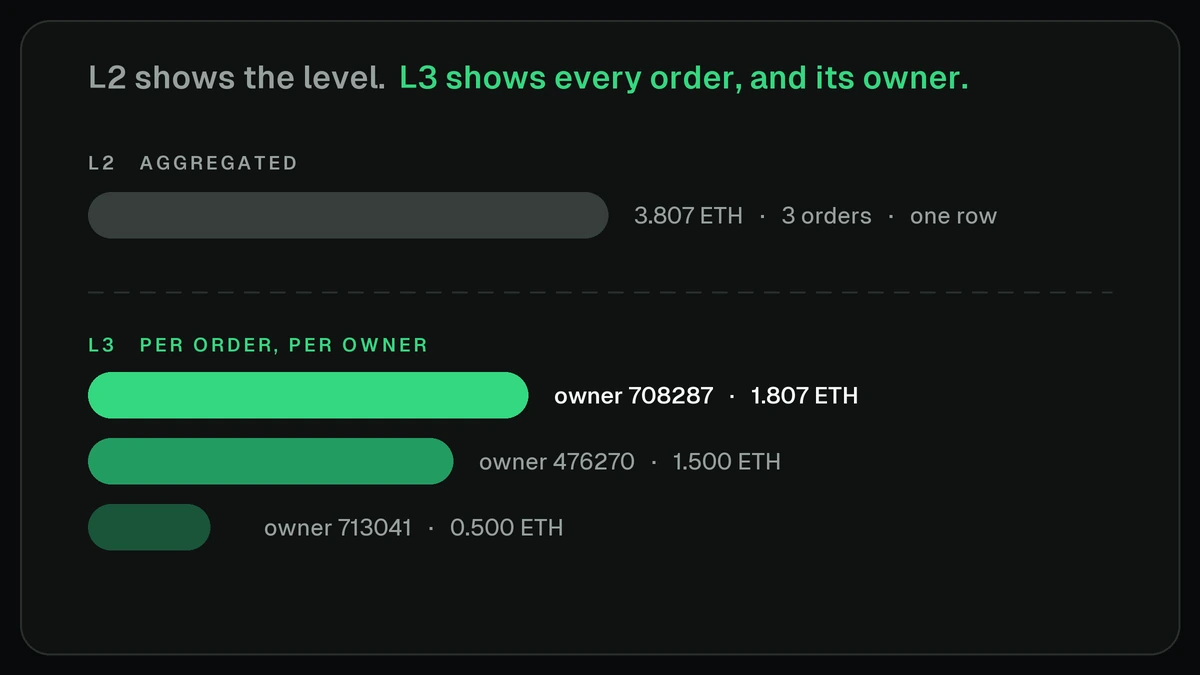
The L2 row tells you 3.807 ETH is bid at that price across 3 orders. The L3 rows tell you which 3 accounts, in what sizes, and in what order they arrived. That last part is the whole point. The difference between L2 and L3 is the difference between a histogram and a ledger.
What L3 carries on Lighter
Lighter is the only venue on 0xArchive that exposes L3. Hyperliquid runs on L4 (event-level order lifecycle), which is a different shape. On Lighter, an L3 snapshot returns an array of resting orders, each with the fields below, plus book-level counts.
| Field | What it is |
|---|---|
order_index | Stable identifier for the resting order. Track it across snapshots to follow a single order's life. |
owner_account_index | The account index that placed the order. This is the attribution key. |
side | bid or ask. |
price | Limit price of the order. |
remaining_size | Size still resting. Falls as the order gets partially filled. |
original_size | Size the order was placed with. Compare to remaining_size to see fill progress. |
The response also carries bid_count and ask_count (orders per side), totals, mid price, and spread. A real ETH snapshot looks like this:
{
  "data": {
    "coin": "ETH",
    "timestamp": "2026-06-28T21:07:16.492Z",
    "mid_price": "1571.12",
    "spread": "0.14",
    "bid_count": 250,
    "ask_count": 250,
    "orders": [
      { "order_index": 562947490139185, "owner_account_index": 476270, "side": "bid",
        "price": 1568.36, "remaining_size": 0.485, "original_size": 0.485 },
      { "order_index": 562947490009211, "owner_account_index": 708287, "side": "bid",
        "price": 1570.85, "remaining_size": 0.400, "original_size": 0.400 },
      { "order_index": 281477344539214, "owner_account_index": 713041, "side": "ask",
        "price": 1573.27, "remaining_size": 3.2233, "original_size": 3.2233 }
    ]
  }
}
Coverage you can build on today: Lighter trades and funding/OI since August 2025, native L2 tick order book since January 2026, and L3 order-level since March 2026, across 200+ markets. Every one of those orders is keyed to the account that placed it, which is what turns the archive from a price series into a behavioral dataset.
What you can do with it
Reconstruct queue position
On L2 you can never answer "where am I in line at this price?" because the level is one number. On L3 the orders at a price arrive in sequence, and a stable order_index lets you place yourself relative to everyone else resting there. Queue position decides whether a passive order fills or gets skipped, so this is the input most order-book backtests are missing.
Attribute behavior to wallets
Every order carries its owner_account_index. Group by owner and the book stops being anonymous. You can see which accounts post the tightest quotes, who pulls liquidity right before prints, who only ever rests on one side, and which handful of accounts actually set the top of book. This is the join key for any market-maker study, flow-toxicity model, or counterparty analysis.
Separate makers from takers
Cross L3 resting orders against the trades feed by order and account. An order that rested and then shrank as a trade printed against it was the maker. The account that lifted it was the taker. Doing this per account, over time, gives you a clean maker/taker profile per wallet instead of a venue-wide ratio.
Spot whales and icebergs
Because you have original_size and remaining_size per order, refills become visible. An order that keeps reappearing at the same price in similar size after each fill is the classic iceberg pattern, and on aggregated data it is invisible. The same fields let you size real resting interest from a single account and flag the orders large enough to move the book.
Build reproducible backtests
L3 history plus the trades feed is enough to replay the book event by event and simulate passive fills with queue priority, not guesswork. Because the archive is fixed history, two people running the same window get the same fills. That reproducibility is the difference between a backtest you can defend and one you can only hope is right.
Worked example: who is really at the top of book
Take the ETH snapshot above. The best bid sits at 1570.85 from owner 708287 for 0.4 ETH. Pull a few minutes of L3 snapshots and follow that order_index. If it stays put while price drifts, that account is a patient maker. If it cancels and reposts a tick higher every time someone joins, it is jockeying for queue priority. Now group every bid by owner_account_index across the window: if three accounts account for most of the size inside two ticks of mid, the book is thinner than the depth chart suggests, because L2 would have shown you the summed size and hidden the concentration. That is a signal you can only get from per-order rows with an owner attached.
How to pull it
Authenticate with the X-API-Key header. L3 is available on every tier, including Free. Start with a single snapshot:
curl -H "X-API-Key: $OXARCHIVE_API_KEY" \
  "https://api.0xarchive.io/v1/lighter/l3orderbook/ETH?depth=50"
For comparison, the L2 book is the aggregated route, and trades are their own feed:
# L2 aggregated book: bids/asks of { px, sz, n }
curl -H "X-API-Key: $OXARCHIVE_API_KEY" \
  "https://api.0xarchive.io/v1/lighter/orderbook/ETH?depth=50"

# Trades: price, size, side, account
curl -H "X-API-Key: $OXARCHIVE_API_KEY" \
  "https://api.0xarchive.io/v1/lighter/trades/ETH"
To study behavior over time, walk snapshots and index orders by owner. A short Python loop:
import os, time, requests
from collections import defaultdict

HEADERS = {"X-API-Key": os.environ["OXARCHIVE_API_KEY"]}
URL = "https://api.0xarchive.io/v1/lighter/l3orderbook/ETH"

size_by_owner = defaultdict(float)

for _ in range(20):                      # 20 snapshots
    r = requests.get(URL, headers=HEADERS, params={"depth": 50})
    book = r.json()["data"]
    for o in book["orders"]:
        if o["side"] == "bid":
            size_by_owner[o["owner_account_index"]] += o["remaining_size"]
    time.sleep(1)

# accounts resting the most bid size across the window
top = sorted(size_by_owner.items(), key=lambda kv: kv[1], reverse=True)[:5]
for owner, size in top:
    print(f"owner {owner}: {size:.2f} ETH cumulative bid size")
For continuous data, subscribe to the lighter_l3_orderbook WebSocket channel instead of polling, and reconcile against periodic REST snapshots. For history, the L3 archive goes back to March 2026, so you can run the same logic over any past window and get the same result every time.
Where to get Lighter L3
Most market-data providers stop at L2 for Lighter: aggregated levels, no per-order detail, no owner. That is enough for a depth chart and nothing past it. 0xArchive carries Lighter L3, every resting order keyed to the account that placed it, over REST and WebSocket, with order-level history since March 2026, alongside L2 tick since January 2026 and trades since August 2025. One key, one schema, both depths.
FAQ
What is the difference between L2 and L3 on Lighter?
L2 is aggregated: one row per price level with total size and an order count. L3 is per order: one row per resting order with its ID, owner, price, and remaining size. L3 lets you reconstruct queue position and attribute orders to accounts; L2 cannot do either.
Does Lighter L3 include the wallet that placed each order?
Yes. Each order carries an owner_account_index. That is the attribution key for maker/taker profiling, market-maker studies, and flow analysis.
How far back does Lighter L3 history go?
L3 order-level data goes back to March 2026. Native L2 tick order book goes back to January 2026, and trades and funding/OI go back to August 2025, which is Lighter's genesis on the archive.
Is L3 available for Hyperliquid?
No. L3 is Lighter only. Hyperliquid exposes L4 event-level order lifecycle data, which is a different shape. If you need per-order owner data on Lighter, that is L3.
Which plan do I need for L3?
L3 is available on every tier, including Free. Every plan gets full venue and depth coverage; plans differ on limits like credits, rate, WebSocket subscriptions, replay, and export. See pricing for current limits.
Can I use L3 for reproducible backtests?
Yes. L3 history plus the trades feed lets you replay the book and simulate passive fills with queue priority. Because the archive is fixed history, the same window returns the same fills, so results reproduce across runs and across people.
REST or WebSocket?
Use REST (/v1/lighter/l3orderbook/{symbol}) for snapshots and historical pulls. Use the lighter_l3_orderbook WebSocket channel for continuous updates, reconciled against REST snapshots.
Start here
Pull one ETH snapshot, group the bids by owner_account_index, and see how few accounts hold the top of book. From there you can reconstruct queue position, profile makers and takers, and run backtests that reproduce. Read the Lighter historical data overview, the Lighter REST reference, and check pricing for the plan that fits your usage.